

A CLEAR-OUT. WITH CLEAR PROGRESS.
A proper clear-out deserves a clear view. See what your mail server has confirmed, without waiting for a full message download.
Try it free on Windows ↓30 days free. Then US$45/year. Optional packs sold separately.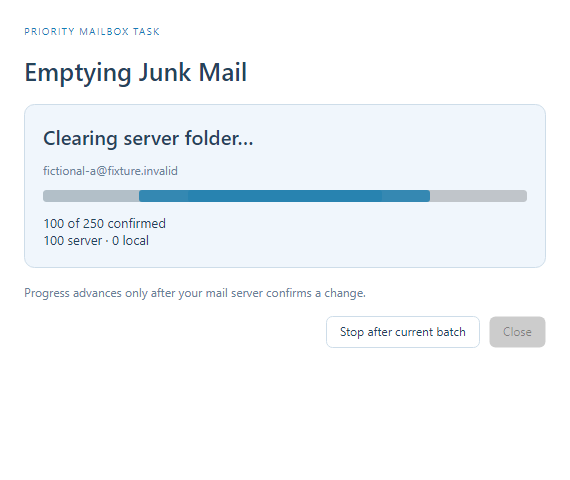
Empty Trash. Empty Junk.
Right-click the folder and choose Empty Trash or Empty Junk Mail. Review the chosen folders and confirm permanent removal first. ANIMAIL includes messages that have not been downloaded, so you do not have to wait for a full sync.
See what is really happening.
A live window shows preparation, confirmed counts and final verification. Delete, Move, Copy, Archive and Junk actions also show their progress. Your selected mailbox stays selected until you change it.
Your click comes first.
Explicit mailbox actions take priority over background downloads and queued work. The window stays responsive while your mail host confirms the changes. An action already reaching the server is allowed to finish safely.
Stop without surprises.
Stop after the current request or batch. Remaining messages are kept. Messages arriving after the reviewed cleanup snapshot are kept, too. Interrupted deletions can be reviewed in Outbox → Folder changes and are never automatically retried.
Your mail host. In step.
Gmail, Microsoft and compatible IMAP accounts use their server folders. Local changes follow confirmed server responses. Offline commands wait for a connection. Empty Trash and Empty Junk are permanent after confirmation; elapsed time depends on the provider and connection.
A LITTLE LESS ORDINARY.
Ready for a happier hello?
Get the native Windows app, with a 30-day trial of the core mail features.

