
NEW A SMARTER LITTLE INBOX
Less filing.
More finding.
Newsletters, receipts, work updates or a favourite person: give mail from an exact address a folder of its own. ANIMAIL files new matching messages when it checks that connected mailbox.
Try ANIMAIL for WindowsAvailable in ANIMAIL for Windows 0.12.78 and later.

THREE LITTLE STEPS
A place for their mail.
Set it once. Let your inbox feel a little lighter.
- 01
Start with a message.
Right-click a received email and choose Always move mail from this sender…
- 02
Make it feel at home.
Choose the destination folder in that message’s mailbox, then save the automatic rule.
- 03
Let ANIMAIL sort.
While ANIMAIL is running and checks that mailbox, new messages from the exact address can move to the folder you chose.
SEE IT IN ANIMAIL
Simple to set. Easy to review.
Your rule and the optional review are two separate steps.
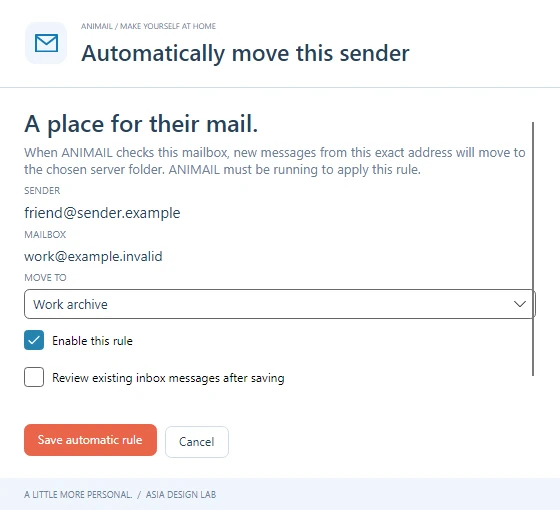
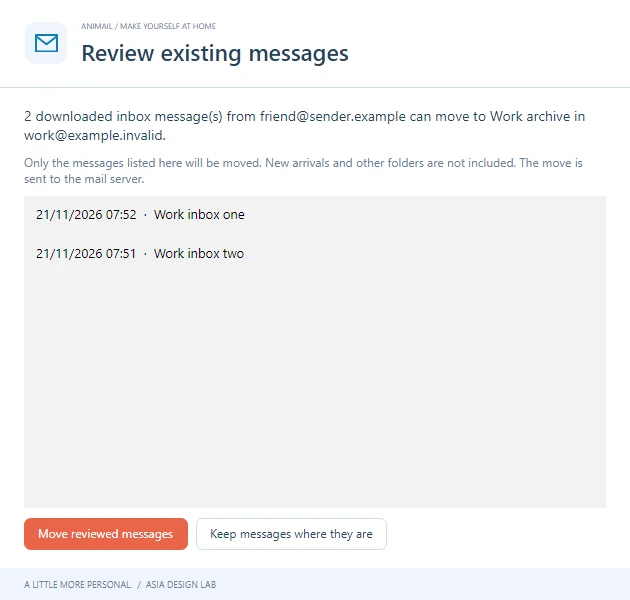
Review the ones already there.
Want to tidy up existing mail too? Choose the optional review after saving. ANIMAIL lists matching downloaded messages from that mailbox’s inbox; you decide whether to move the reviewed messages. Other folders and later arrivals are not part of that review.
Your folder. Your account.
A rule is tied to the selected mailbox and exact sender address. When the move is confirmed, it is reflected with your mail provider. Supported Gmail labels and compatible server folders are available according to your account.
You stay in control.
Edit or turn off the rule when your needs change. ANIMAIL must be running and checking the account to apply it. Interrupted or conflicting automatic moves can be held for review.

